 Velo Workspaces
Written with the help of an AI assistant, and reviewed by me.
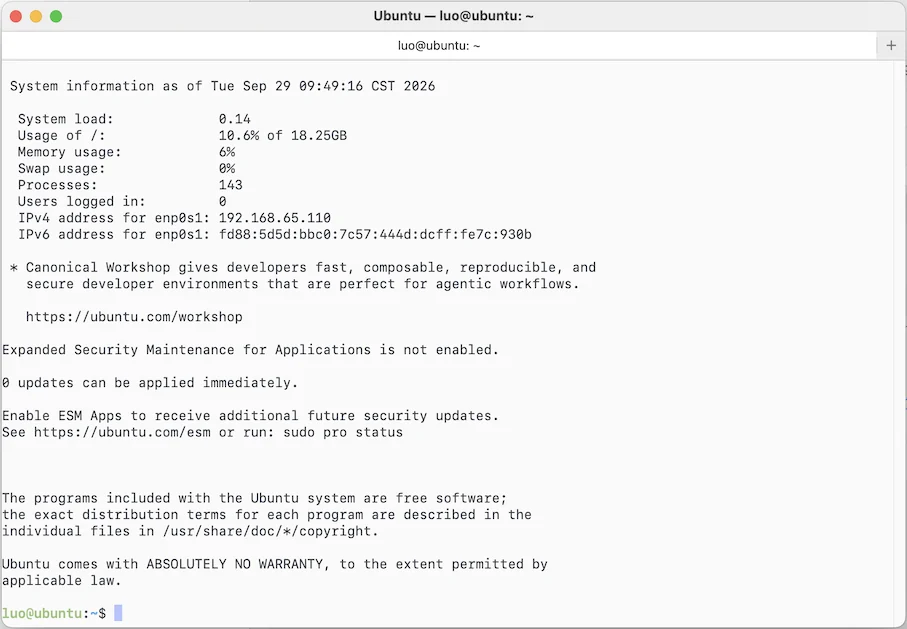
The feature sounded simple. Click Open Terminal on a running Linux VM and get a shell, already signed in. No copying IP addresses, no typing passwords, no known_hosts prompt.
 Click to enlarge
What it means for your keys
- Your private key stays on your Mac. Its 32 bytes live in your login keychain. They're never written anywhere else, and never logged.
- The first connection is verified. For a workspace made from a cloud image, Velo Workspaces creates the workspace's host key itself, so it knows the key before the workspace first boots. There's no fingerprint to accept blindly.
- A changed host key is never accepted silently. You're asked, with the old and new fingerprints side by side.
- The app never listens on the network. It only makes outgoing connections, so nothing on your network can connect to it.
- An exported key is private from the first byte. The file is created readable only by you before the key is written into it.
The rest of this post is for the curious, and for other Mac developers: how the terminal is built, and the details that took longest. Two things made it interesting. The app is sandboxed, because it's in the Mac App Store. And the other end is a VM the app itself just created, which turns out to be an advantage once you use it.
Why not just run /usr/bin/ssh?
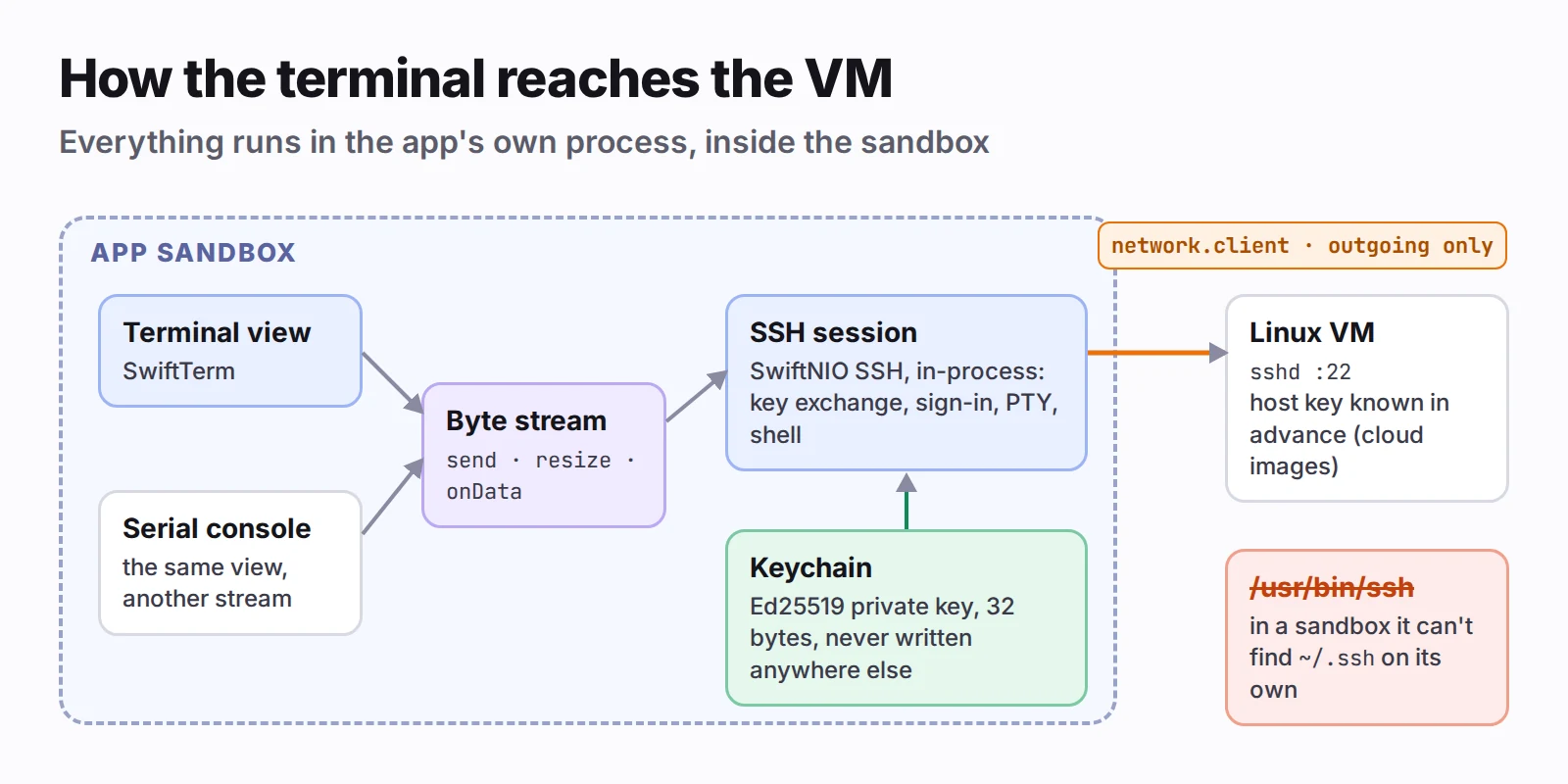
macOS ships OpenSSH, and SwiftTerm, the terminal view I already used, can run a process in a PTY. That was my first idea, and it does run. But a child process inherits the app's sandbox, and that's where it falls apart.
OpenSSH finds ~/.ssh by asking the system for the user's home directory, which gives the real home, not the app's container. The sandbox denies access to it. Every path ssh normally finds on its own then has to be passed in: -i for the key, -F for the config, -o UserKnownHostsFile= for known hosts, all pointing into the container. It works, but it's fragile, and a sandboxed app spawning command-line tools is the kind of thing that invites questions from App Review.
So the SSH client had to live inside the app. The options I weighed:
- SwiftNIO SSH (Apple's
swift-nio-ssh): in-process and maintained by Apple, with Ed25519 and ECDSA keys. It doesn't support RSA user keys, and you write a few hundred lines of client code yourself. - Citadel, built on SwiftNIO SSH: adds RSA and needs less code, but it's a community dependency whose API was still changing.
- libssh2 with OpenSSL: supports everything, at the cost of C dependencies, binary frameworks and keeping up with their security fixes.
I picked SwiftNIO SSH, behind a small protocol of my own, so swapping in Citadel later would be a contained change if RSA turns out to matter. For keys the app makes itself, Ed25519 is the right choice anyway.
 Click to enlarge
Keys: CryptoKit, the Keychain, and OpenSSH's formats
The app makes one key the first time it needs one, named for the Mac:
import CryptoKit

let key = Curve25519.Signing.PrivateKey()
The private key's raw 32 bytes go into the login keychain as a generic password item, keyed by the key's ID. Its name, public key and fingerprint go into the app's preferences. Private key material is never written anywhere else, and never logged.
The VM needs the public half in OpenSSH's one-line format. That line is ssh-ed25519, then base64 of a small binary blob, then an optional comment. The blob is two SSH strings, each a 4-byte big-endian length followed by the bytes: the key type, then the 32-byte public key.
import CryptoKit
import Foundation

extension Data {
    mutating func appendSSHString(_ bytes: Data) {
        var length = UInt32(bytes.count).bigEndian
        append(Data(bytes: &length, count: 4))
        append(bytes)
    }
}

func publicKeyBlob(_ key: Curve25519.Signing.PublicKey) -> Data {
    var blob = Data()
    blob.appendSSHString(Data("ssh-ed25519".utf8))
    blob.appendSSHString(key.rawRepresentation)
    return blob
}

func publicKeyLine(_ key: Curve25519.Signing.PublicKey, comment: String) -> String {
    "ssh-ed25519 " + publicKeyBlob(key).base64EncodedString() + " " + comment
}

/// "SHA256:" and the unpadded base64 of the blob's SHA-256, as ssh-keygen -l prints it.
func fingerprint(_ key: Curve25519.Signing.PublicKey) -> String {
    let digest = Data(SHA256.hash(data: publicKeyBlob(key)))
    return "SHA256:" + digest.base64EncodedString().replacingOccurrences(of: "=", with: "")
}
The fingerprint is worth getting exactly right. People compare it with what ssh-keygen -l prints, and a version that's off by one padding character looks like a security problem.
The same key is useful from Terminal and VS Code too, so the app can export it as an unencrypted openssh-key-v1 file. That file is created with mode 0600 before a byte of the key is written into it, so it's never readable by anyone else, even for a moment. A symbolic link at the chosen path is refused rather than followed. Importing an existing key works the same way in reverse; passphrase-protected keys are refused for now, with a message that says so.
Host keys: pinning instead of "trust on first use"
The usual SSH experience on a first connection is a fingerprint you can't verify and a yes you type anyway. Here, the app creates the VM, so it can do better.
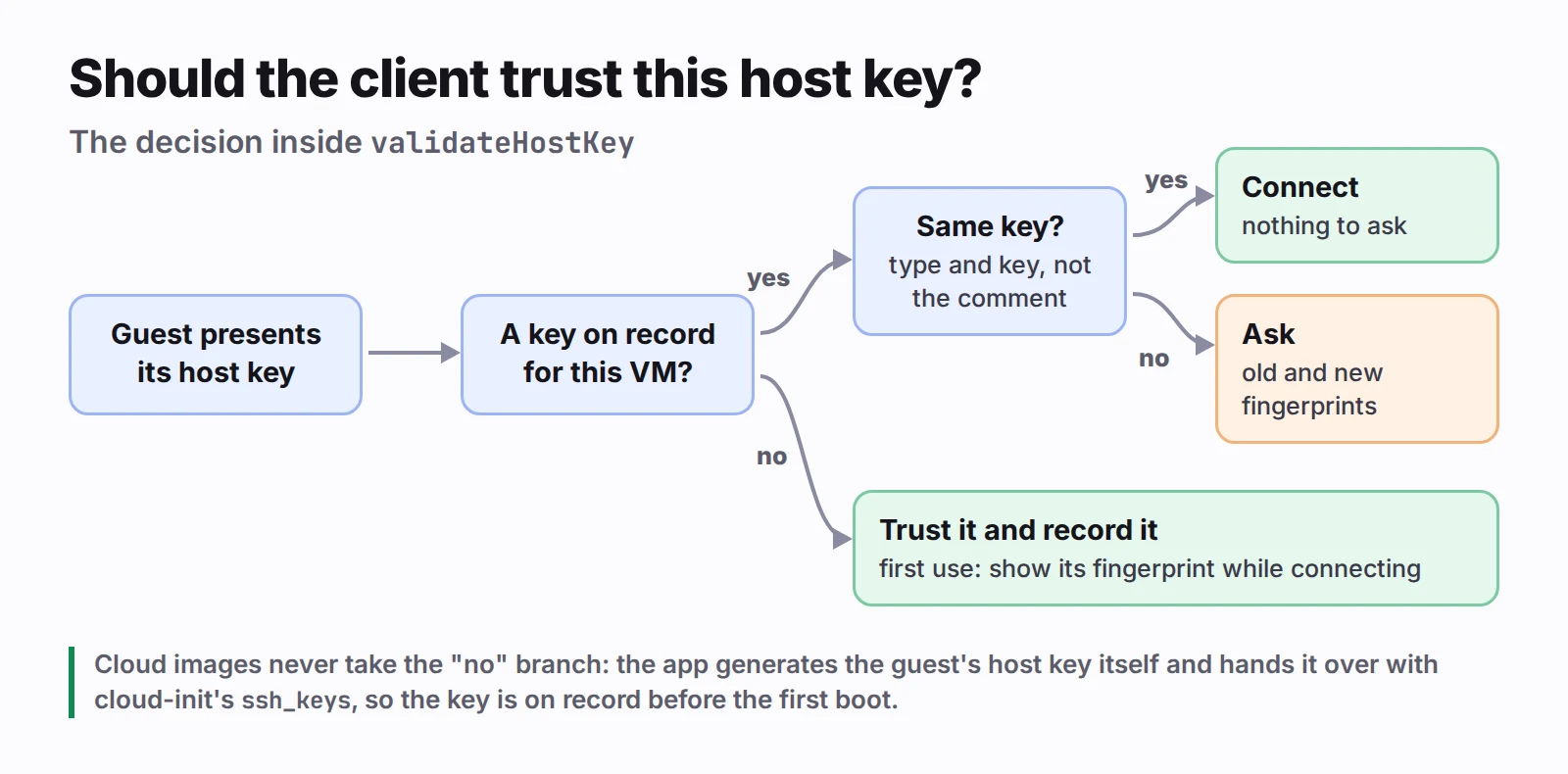
For VMs made from cloud images, the app generates the guest's SSH host key itself and hands it to the guest through cloud-init's ssh_keys. It already knows the host key before the VM has booted. The first connection is checked like any other, and there's nothing to ask.
For VMs installed from an ISO, the installer generates the host key, so the app trusts the first one it sees and shows the fingerprint as it does. If the key ever changes, it asks. A changed key is legitimate after a reinstall or a snapshot restore, and the dialog shows the old and new fingerprints side by side.
 Click to enlarge
In SwiftNIO SSH, that decision lives in a server authentication delegate:
struct HostKeyChanged: Error {}

final class HostKeyDelegate: NIOSSHClientServerAuthenticationDelegate {
    let knownHostKey: String?   // "ssh-ed25519 AAAA…", or nil if none on record yet

    init(knownHostKey: String?) { self.knownHostKey = knownHostKey }

    func validateHostKey(hostKey: NIOSSHPublicKey,
                         validationCompletePromise: EventLoopPromise<Void>) {
        let presented = String(openSSHPublicKey: hostKey)
        guard let known = knownHostKey else {
            validationCompletePromise.succeed(())   // first use: record `presented`
            return
        }
        if sameKey(presented, known) {
            validationCompletePromise.succeed(())
        } else {
            validationCompletePromise.fail(HostKeyChanged())
        }
    }
}
sameKey compares the type and the key, not the whole line: a comment isn't part of a key.
Signing in is a second delegate, NIOSSHClientUserAuthenticationDelegate. It offers the key first, then the password if the guest takes one, once each. If the password works, that's the moment to offer to install the key, so next time there's no password at all.
The shell itself
Once the session channel is open, the client asks for a pseudo-terminal and a shell:
func channelActive(context: ChannelHandlerContext) {
    let pty = SSHChannelRequestEvent.PseudoTerminalRequest(
        wantReply: false,
        term: "xterm-256color",
        terminalCharacterWidth: columns,
        terminalRowHeight: rows,
        terminalPixelWidth: 0,
        terminalPixelHeight: 0,
        terminalModes: SSHTerminalModes([:])
    )
    context.triggerUserOutboundEvent(pty, promise: nil)
    context.triggerUserOutboundEvent(SSHChannelRequestEvent.ShellRequest(wantReply: false), promise: nil)
    context.fireChannelActive()
}
When the window is resized, a WindowChangeRequest tells the guest the new size, so programs like vim and htop redraw correctly.
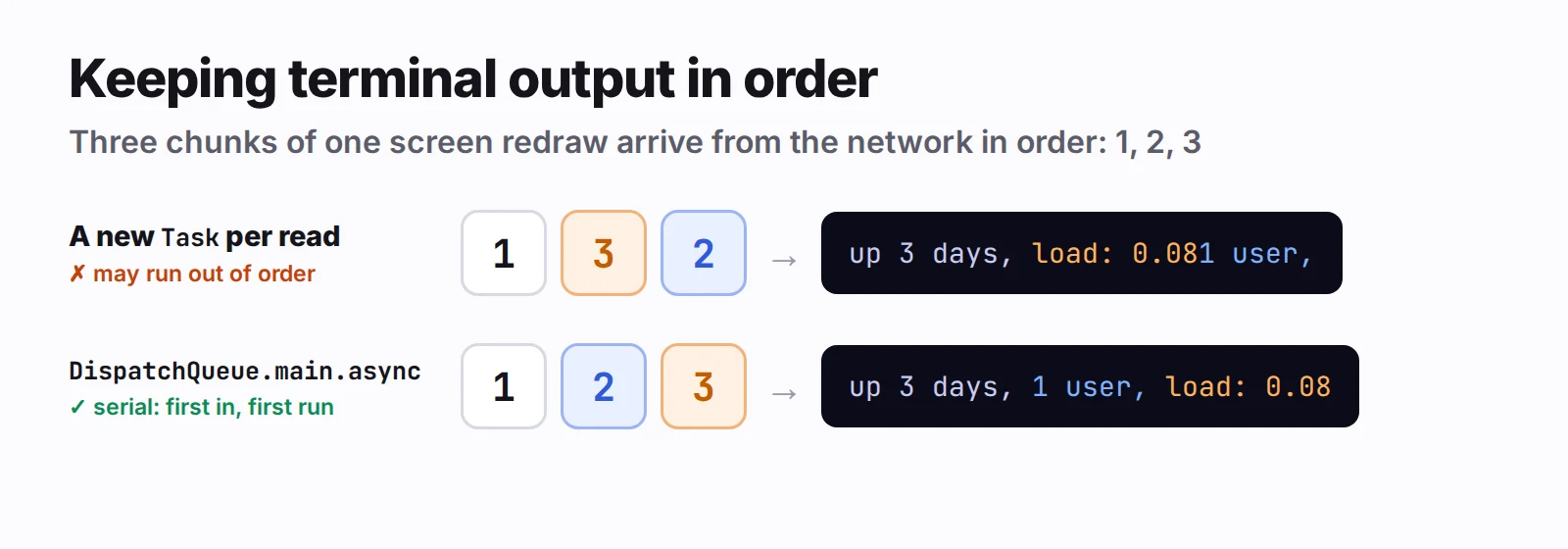
One bug here is easy to write and hard to notice. Data arrives on SwiftNIO's event loop, and the terminal view lives on the main actor. Starting a new Task for each read looks natural, but Swift doesn't promise those tasks run in the order they were created. If two chunks of a screen redraw ever ran swapped, the terminal would show garbage. Delivering every read with DispatchQueue.main.async keeps them in order, because the main queue is serial and runs blocks in the order they were added.
 Click to enlarge
The same SwiftTerm view also shows the VM's serial console. Both sources sit behind one small byte-stream protocol, with send, resize and a data callback, so the terminal doesn't know or care which one it's talking to.
Installing a key with one command, in any shell
"Install Key" runs a command over the connection that's already open, on a channel of its own, so the shell next to it isn't touched:
umask 077 && mkdir -p ~/.ssh && touch ~/.ssh/authorized_keys
  && { grep -qxF 'KEY' ~/.ssh/authorized_keys || printf '%s\n' 'KEY' >> ~/.ssh/authorized_keys; }
  && chmod 700 ~/.ssh && chmod 600 ~/.ssh/authorized_keys
  && if command -v restorecon >/dev/null 2>&1; then restorecon -R ~/.ssh; fi
(Shown on several lines; it's sent as one, wrapped in sh -c '…'.) Each part is there for a reason. grep -qxF means running it twice doesn't add the key twice. The braces matter, because && and || have equal precedence in sh. And restorecon fixes the SELinux label that Fedora's and Rocky's sshd check, where it exists.
The quoting took longest. The key is quoted twice: once inside the script, and then the whole script again for sh -c. And sshd hands that command to the account's login shell before sh ever sees it. The textbook way to put a single quote inside single quotes is '\''. Quoted twice, that leaves a backslash inside single quotes, and fish reads a backslash before a quote as an escape even there. A key comment like Kofi's MacBook Pro then reaches sh torn in half. Using '"'"' instead (end the quote, a double-quoted single quote, start again) puts no backslash anywhere, and sh, bash, zsh, fish and tcsh all read it the same way.
Two SwiftNIO details came out of review:
- Every promise must be completed. If opening the channel fails, nothing will ever complete the exit-status promise, and SwiftNIO stops a debug build on a promise that's dropped unfulfilled. Fail it explicitly on that path.
- A command that never ends must not leave a spinner spinning. A scheduled task closes the channel after 20 seconds, and is cancelled when the command finishes first.
What the sandbox still decides
Outgoing connections only. The app has the com.apple.security.network.client entitlement and no server entitlement. Port forwarding from the Mac into a VM would mean listening on a port, which needs network.server as well. For reaching a VM from another computer, the app shows an ssh -J command instead. It hops through the Mac's own Remote Login, so the app listens on nothing.
The Local Network prompt. On recent versions of macOS, connecting to a VM's address counts as talking to the local network, and the first attempt brings up the system's permission prompt. Two lessons from that:
- Don't probe what nobody will use. The app checks whether a VM's SSH port is up, and each check is a local network connection. Checking every VM, including ones nobody would ever sign in to, made the prompt appear for no visible reason. Now it checks only Linux VMs that have an account the app knows about, and never while an installer is running.
- Tell "denied" apart from "down." When access is denied, the connection doesn't fail outright; it waits. Its path's
unsatisfiedReasonis.localNetworkDenied, and that's the signal to show "No Local Network access" with a button to the right settings page, instead of spinning forever.
Takeaways
- In a sandboxed app, an in-process SSH library beats wrapping
/usr/bin/ssh, which can't find~/.sshon its own. - If you create the server, create its host key too, and pin it. Trust on first use is a fallback, not a default.
- Get OpenSSH's formats byte-exact. People will compare fingerprints.
- Quote for the login shell you don't know about.
'"'"'survives all of them. - Keep terminal output in order: a serial queue, not a task per read.
- Treat the Local Network prompt as part of your design, not something that happens to you.
Open Terminal is part of Velo Workspaces Pro. The key, the connection details and a copyable ssh command are free, for Terminal, VS Code or another computer. SSH and VS Code into a Linux VM shows both.