 Velo Workspaces
This is the story of a bug in Velo Workspaces, the app this site is about, and of something I hadn't known about how Linux installer ISOs for ARM are built. The checks and the script near the end work on any ISO, whichever VM you boot it in. Written with the help of an AI assistant, and reviewed by me.
The test round
Just before I sent version 1.2 to App Review, I ran every distribution in the app's library on an M4 Mac. 1.2 was the release that installs Linux for you: cloud images that set themselves up on first boot, and the distributions' own installers driven unattended, with Ubuntu's autoinstall and Anaconda's kickstart.
Every cloud image worked. Three things didn't:
- Fedora Server's automatic install failed partway through boot.
- Rocky Linux's failed the same way.
- NixOS's installer reached its GRUB menu. Once the kernel was chosen, the screen went black and stayed black.
The odd part was the first two. The same kickstart, generated by the same build of the app, installed Fedora and Rocky Linux without a hitch on the Intel Mac.
Two error messages that agreed with each other
Anaconda's console had two things to say. Early on:
parse-kickstart WARNING: No device with link found for --device=link
Then, after a long pause, a dracut banner saying the inst.stage2 or inst.repo boot option was missing, with a reminder that the inst. prefix is mandatory now.
Read together they told a tidy story. The kickstart's network --device=link line found no interface with a link, so networking on Apple silicon's virtual hardware was different somehow. And the installer's boot options were wrong. Both pointed at the configuration, and both said "this is different on ARM".
I believed them.
The wrong conclusion
I decided Anaconda's kickstart path didn't work under Apple silicon's virtualization, and spent part of a day making that official. Kickstart was driven on Intel Macs only. A note on the Image step sent Apple silicon users to Fedora's cloud image instead. The App Store description, in all ten languages, now said automatic Fedora and Rocky Linux installs were for Intel Macs. NixOS, with its unexplained black screen, came out of the library and went into the backlog.
All of that was committed. None of it was released: a few hours later every part of it was reverted, because the NixOS bug turned out to be the same bug, and it wasn't Fedora's, Rocky's or NixOS's. It was mine.
The black screen
NixOS's installer boots like most live ISOs. GRUB loads a kernel and an initrd from the image. Then stage 1, the initrd's init, waits for the ISO itself to appear as a block device, by its volume label, here /dev/disk/by-label/nixos-minimal-26.05-aarch64, mounts it and finds the Nix store on it. If the device never appears, stage 1 waits, and nothing more happens on the screen.
So the useful question wasn't "what's wrong with NixOS". It was "what did the VM actually boot from?" The answer was a disk I hadn't meant to give it.
Apple's Virtualization framework has no CD drive. A virtual machine gets virtio block devices, NVMe and USB mass storage, and nothing optical. An installer ISO has to be attached as a disk, and the guest's UEFI firmware boots a disk the way it boots any disk. It reads the partition table, finds the EFI System Partition, and runs \EFI\BOOT\BOOTAA64.EFI from it.
NixOS's aarch64 ISO has no partition table.
Velo Workspaces inspects an installer ISO when you create a workspace, and it classified this one as "optical only": bootable as a CD, not as a disk. For that case the app had an older code path. It copied the ISO's boot files onto a new FAT32 disk image, which any UEFI firmware will boot. It had been written for a different installer, one that copes with that. The code that starts a workspace had been guarded to build the copy only for that installer. The code that creates a workspace's disks never got the same guard, and it ran for every "optical only" ISO.
For NixOS, a manual install, only the copy was attached. GRUB and the kernel were on it, so they loaded. The ISO 9660 volume labelled nixos-minimal-26.05-aarch64 wasn't attached at all. Stage 1 waited for it, forever, behind a black screen.
Why would an ISO have no partition table?
This is the part I hadn't known.
CDs and disks boot differently. A CD boots through El Torito. Among the ISO's volume descriptors is a boot record that points to a boot catalog, and the catalog lists boot images. For UEFI, the boot image is a small FAT filesystem with the boot loader in it. Firmware reading a CD follows that chain. Firmware reading a disk looks at sector 0 for a partition table.
For years, distributions have made their ISOs work both ways. ISO 9660 leaves the first 32 KB of an image unused. It calls that space the "system area" and reserves it for the platform to use. isohybrid images write an MBR or GPT into it. A CD drive ignores it and follows El Torito; anything that sees the file as a disk finds a partition table. That's why you can dd most ISOs onto a USB stick and boot them.
Most ISOs do this on x86. On ARM, not all of them do:
- Fedora's and Rocky Linux's boot media come from lorax. Its
x86.tmplpasses--grub2-mbrand appends a GPT EFI partition. Itsaarch64.tmplpasses-eltorito-alt-boot -e images/efiboot.img -no-emul-boot, which means El Torito and nothing else. - NixOS's aarch64 ISO is made without
-isohybrid-mbr. Only its x86 image gets that flag.
Every aarch64 ISO I tested from these projects came out the same: Fedora Server and Everything, Rocky's minimal and DVD images, and NixOS. All of them had El Torito, and their system area was 32 KB of zeros.
That explained Fedora and Rocky too. Their automatic install has its own boot media, an APFS clone of the ISO with GRUB's configuration rewritten to go straight into the install (more on that below). But the creation step had also built the FAT copy, since the ISO was "optical only", and when both existed, the copy booted. GRUB showed the stock menu. The kernel loaded. dracut found the kickstart, which Velo Workspaces puts on a small separate disk labelled OEMDRV that Anaconda looks for on its own; that's why parse-kickstart ran at all. Then dracut waited for the installer's root:
inst.stage2=hd:LABEL=Fedora-S-dvd-aarch64-44
hd:LABEL= means "a disk whose filesystem has this label". On a real DVD, that's the ISO 9660 volume itself. In this VM, no attached disk had that label.
On the Intel Mac the x86_64 ISOs are hybrids. The copy was never built, the rewritten clone booted, and kickstart worked. It was the same app and the same kickstart; only the ISO layout differed.
What the two messages actually meant
With the cause in hand, I went back to the two messages, because they'd sent me the wrong way and I wanted to know why. The lesson is an old one: find the code that prints the message. It often isn't the code that failed.
The dracut banner comes from Anaconda's anaconda-error-reporting.sh. It's installed as a dracut initqueue/timeout hook, and dracut runs those hooks when it gives up waiting for the root device, whatever the reason. The text guesses at the most common cause, a missing or old-style boot option, and it prints that guess for every cause. My boot options were fine. All the banner really told me was that dracut had waited for the installer's root and it never showed up.
The link warning comes from parse-kickstart, early in the initramfs. Its first_device_with_link() reads each interface's carrier before the network has been brought up, so it can easily find no link. It then falls back to ip=dhcp, and Anaconda applies --device=link again in stage 2, when the interface is up. It was noise. (The other common choice, --device=bootif, only means something after a PXE boot, which passes BOOTIF= on the command line.)
Both messages were true. Neither was about the problem.
The fix: one partition entry
Stopping the copy for Linux was one line. But then the firmware has nothing it can boot, because the ISO is still not a disk.
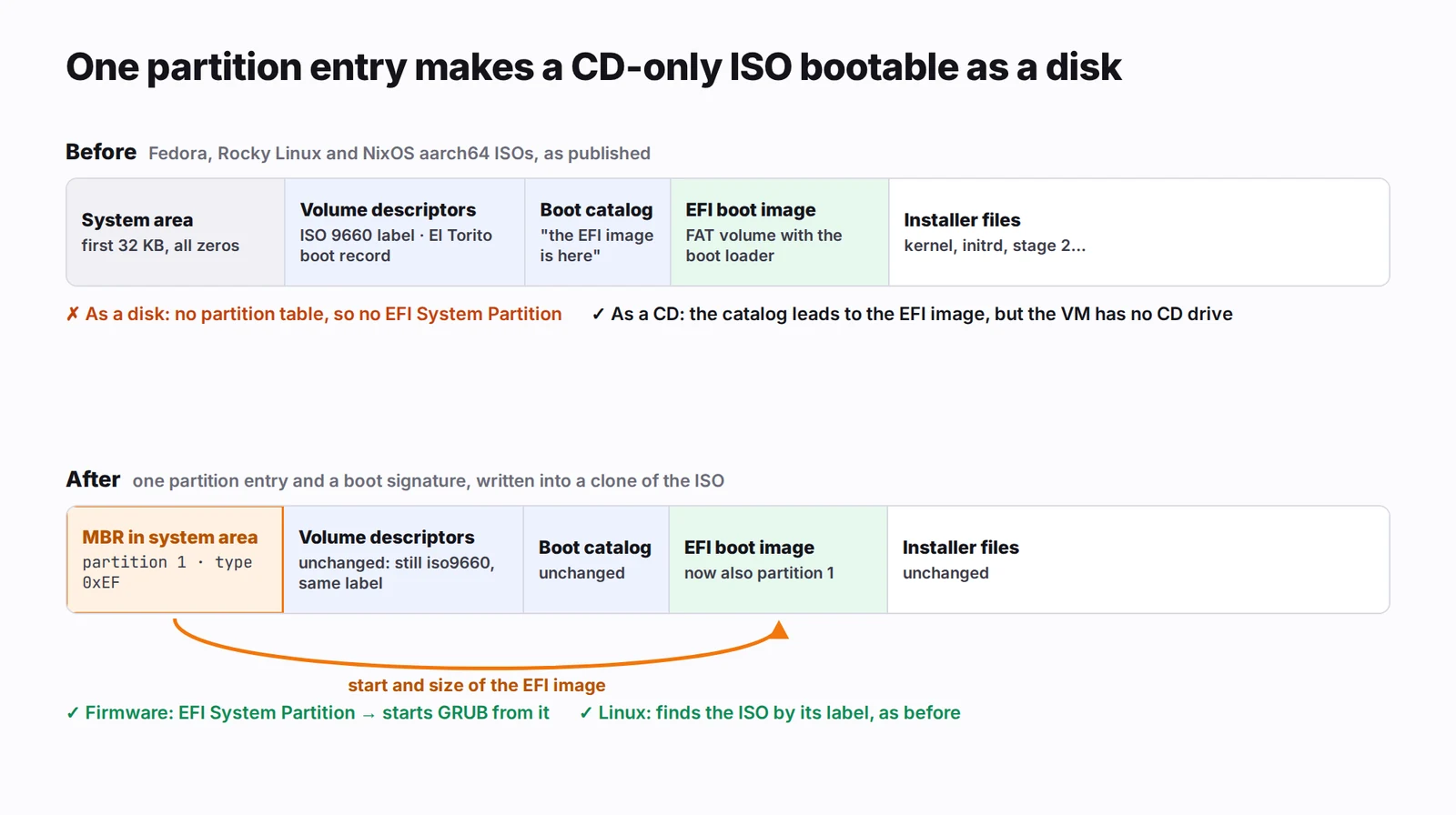
The El Torito catalog already says where the EFI boot image is and how big it is. The firmware wants an EFI System Partition. So the EFI boot image can also be a partition: write an MBR into the empty system area, with one entry of type 0xEF covering exactly the bytes El Torito points at. That's what isohybrid --uefi does, and what xorriso's -efi-boot-part --efi-boot-image does at build time with GPT.
 Click to enlarge
Nothing else changes. The volume descriptors, the catalog and the files are where they were, and ISO 9660 readers never look at the system area. Linux still probes the whole device, finds an iso9660 filesystem with the same label, and the installer finds its disc. The firmware finds a partition table, an EFI System Partition, and GRUB inside it.
The entry is 16 bytes at offset 446, and the boot signature is 2 bytes at offset 510:
offset 446  00            status: not active (UEFI doesn't use it)
       447  FE FF FF      first sector, CHS: "out of range, use the LBA"
       450  EF            type: EFI System Partition
       451  FE FF FF      last sector, CHS: same
       454  xx xx xx xx   first sector (LBA) = El Torito's sector × 4
       458  xx xx xx xx   size in 512-byte sectors
offset 510  55 AA         boot signature
The × 4 is because El Torito counts 2,048-byte CD sectors and an MBR counts 512-byte disk sectors.
The size takes one more step. The catalog entry has a sector count, but it's 16 bits of 512-byte units, so it can't describe a boot image over 32 MB. The FAT boot sector at the start of the image knows the real size. Its bytes per sector are at offset 11, and its total sectors at offset 19, or at offset 32 when that's zero. The size comes from there.
On NixOS 26.05 the boot image is /boot/efi.img at CD sector 53, a 3 MB FAT12 volume labelled EFIBOOT. The entry starts at sector 212 (D4) and runs for 6,144 sectors (00 18). Over a zeroed system area, cmp counts exactly 11 changed bytes:
- the two
FE FF FFruns (six bytes) - the type byte
- one byte of the start
- one byte of the size
- the two signature bytes
Fedora's image sits elsewhere on its disc, so its numbers are different and the count may be a byte or two higher. It's the same entry either way.
Velo Workspaces does this on an APFS clone of the ISO. A clone shares every block with the original, so it takes no time and no disk space, and the ISO in your library is never touched. For an automatic install, the clone with the rewritten GRUB configuration is the one that gets the partition table, in place. An ISO whose catalog has no EFI boot image is refused when you create the workspace, with a message that says so, instead of failing at boot. And the FAT copy is made only for the installer it was written for.
I didn't repack the ISO with xorriso. That would mean bundling a tool like xorriso in a sandboxed app and writing a new multi-gigabyte file every time. The partition entry is 18 bytes written into a file that already exists.
Try it yourself
Here's the same logic as a standalone Python script with no dependencies. It finds the boot record, walks the catalog for a bootable EFI entry, sizes the image from its FAT boot sector, and writes the entry. It refuses an ISO that already has a partition table.
#!/usr/bin/env python3
"""hybridize.py IMAGE.iso

Give an El Torito-only ISO an MBR with one EFI System Partition over the
EFI boot image its catalog already points at, so UEFI firmware can boot it
as a disk. Edits the file in place: run it on a copy.
"""
import struct
import sys

CD = 2048  # ISO 9660 sector size; MBRs count 512-byte sectors

with open(sys.argv[1], "r+b") as f:
    def read(offset, size):
        f.seek(offset)
        return f.read(size)

    # 1. Never overwrite a partition table that's already there.
    mbr = read(0, 512)
    if mbr[510:512] == b"\x55\xaa" and any(mbr[446 + 16 * n + 4] for n in range(4)):
        sys.exit("already has a partition table")

    # 2. El Torito's boot record is a volume descriptor from sector 16 on.
    catalog = None
    for sector in range(16, 64):
        vd = read(sector * CD, CD)
        if vd[0] == 255:                      # descriptor set terminator
            break
        if vd[0] == 0 and vd[7:30] == b"EL TORITO SPECIFICATION":
            catalog = struct.unpack_from("<I", vd, 71)[0]
            break
    if catalog is None:
        sys.exit("no El Torito boot record")

    # 3. In the catalog, find the bootable, no-emulation entry for EFI (0xEF).
    cat = read(catalog * CD, CD)
    if cat[0] != 1 or cat[30:32] != b"\x55\xaa":
        sys.exit("bad boot catalog")
    platform, entry = cat[1], None            # the default entry's platform
    for i in range(32, CD, 32):
        kind = cat[i]
        if kind in (0x90, 0x91):              # section header: a new platform
            platform = cat[i + 1]
        elif kind == 0x88 and platform == 0xEF and cat[i + 1] & 0x0F == 0:
            count, rba = struct.unpack_from("<HI", cat, i + 6)
            entry = (rba, count)
            break
    if entry is None:
        sys.exit("no EFI boot image in the catalog")
    rba, count = entry

    # 4. Size it by its FAT boot sector: the catalog's count is 16 bits of
    #    512-byte units, too small for an image over 32 MB.
    boot = read(rba * CD, 512)
    sectors = count
    if boot[510:512] == b"\x55\xaa":
        per_sector = struct.unpack_from("<H", boot, 11)[0]
        total = struct.unpack_from("<H", boot, 19)[0] or struct.unpack_from("<I", boot, 32)[0]
        if per_sector and total:
            sectors = total * per_sector // 512

    # 5. One partition entry of type 0xEF, and the boot signature. CHS
    #    fields say "beyond CHS"; firmware and Linux read only the LBAs.
    part = bytes([0x00, 0xFE, 0xFF, 0xFF, 0xEF, 0xFE, 0xFF, 0xFF])
    part += struct.pack("<II", rba * CD // 512, sectors)
    f.seek(446)
    f.write(part)
    f.seek(510)
    f.write(b"\x55\xaa")
    print(f"EFI partition: start {rba * CD // 512}, {sectors} sectors ({sectors * 512 // 1024} KiB)")
First, check whether your ISO needs it. These 66 bytes are the four partition entries and the signature:
hexdump -C -s 446 -n 66 installer.iso
An El Torito-only ISO prints nothing but zeros:
000001be  00 00 00 00 00 00 00 00  00 00 00 00 00 00 00 00  |................|
*
000001fe  00 00                                             |..|
If you have xorriso (Homebrew and every Linux distribution package it), it will show you the catalog too:
xorriso -indev installer.iso -report_el_torito plain -report_system_area plain
Then run the script on a copy. On a Mac, cp -c makes the copy an APFS clone, so it's instant:
cp -c installer.iso installer-hybrid.iso
python3 hybridize.py installer-hybrid.iso
On a small test image built with lorax's aarch64 options and Fedora's volume label, it prints:
EFI partition: start 140, 6144 sectors (3072 KiB)
The same 66 bytes afterwards:
000001be  00 fe ff ff ef fe ff ff  8c 00 00 00 00 18 00 00  |................|
000001ce  00 00 00 00 00 00 00 00  00 00 00 00 00 00 00 00  |................|
*
000001fe  55 aa                                             |U.|
On Linux, sfdisk -l now sees the partition, and blkid still sees the whole file as the same ISO:
$ sfdisk -l installer-hybrid.iso
Disklabel type: dos
Device                Boot Start   End Sectors Size Id Type
installer-hybrid.iso1        140  6283    6144   3M ef EFI (FAT-12/16/32)

$ blkid installer-hybrid.iso
installer-hybrid.iso: BLOCK_SIZE="2048" UUID="2026-10-02-05-58-59-00" LABEL="Fedora-S-dvd-aarch64-44" TYPE="iso9660" PTTYPE="dos"
xorriso even maps the partition back to the file it covers:
MBR partition table:   N Status  Type        Start       Blocks
MBR partition      :   1   0x00  0xef          140         6144
MBR partition path :   1  /images/efiboot.img
(The sfdisk output is trimmed to the relevant lines.)
Checking that the partition really does the work
Before trusting this on Apple's firmware, which I can't inspect, I wanted to know that the partition alone was enough. El Torito shouldn't be quietly helping.
So I used QEMU's virt machine with AAVMF 2024.02 firmware, attached the hybridized NixOS 26.05 image as a USB disk, and switched El Torito off, so the partition was the only way in. It booted to GRUB. Stage 1 then mounted /sysroot/iso by its label, mounted the squashfs store, and reached the installer's multi-user target with the nixos session. The same image without the partition found nothing to boot: Not Found, then the UEFI shell.
One honest caveat. That same AAVMF firmware will boot an untouched ISO through El Torito from a USB disk. Whether Apple's firmware does, I don't know, and Apple doesn't say. With the partition in place, it doesn't matter.
Then the real test, back on the M4: Fedora Server and Rocky Linux installed unattended, and NixOS's installer booted and installed by hand. The "Intel only" note, the App Store change and NixOS's trip to the backlog were all reverted before release.
Bonus: rewriting GRUB without moving a byte
The automatic install's clone has one more trick, and in the end it's the part the story turned on, so here it is.
To go straight into installing, with no boot menu to wait out, Velo Workspaces rewrites GRUB's configuration in the clone. It keeps only the first menu entry, sets timeout=0, and adds any extra arguments to the linux line. Ubuntu gets autoinstall. Anaconda needs none, because it finds the OEMDRV disk by itself.
It does this in place, without touching the filesystem around the file. ISO 9660 stores each file as one extent and records its length, and FAT records a file's length in its directory entry. If the new configuration is exactly as long as the old one, no directory entry, extent or allocation table changes, and nothing else in the image moves. Dropping the other menu entries makes the text shorter, so it's padded back to the original length with a comment line.
Where the configuration lives depends on the distribution. Ubuntu's signed GRUB reads /boot/grub/grub.cfg from the ISO's own filesystem. Fedora's and RHEL's read /EFI/BOOT/grub.cfg, which exists twice: once in the ISO tree and once inside images/efiboot.img. Every copy is rewritten, so whichever one GRUB reads says the same thing.
That rewrite was right all along. The VM just wasn't booting it.
What I'd tell myself a week earlier
- Read the code that prints the error. dracut's banner is a timeout hook printing its best guess. The link warning was a race that sorts itself out later. Both were true, and both pointed away from the cause.
- Check what the VM actually booted. Not what you meant to attach: what was attached, and which disk the firmware picked.
- A guard in one place isn't a guard everywhere. The code that started a workspace knew the copy was only for one installer. The code that ran before it didn't.
- Don't ship a workaround before you've found the cause. "Intel only" got as far as App Store text in ten languages, for a bug that had nothing to do with Intel.
- Test every architecture you ship for, with the real media. The x86 ISOs are hybrids and the ARM ones aren't, so every Intel test passed.
And if you maintain an aarch64 ISO build: a UEFI partition in the system area costs nothing, and it makes your image bootable as a disk anywhere, including in virtual machines that have no CD drive.
Where it ended up
Velo Workspaces 1.2 installs Fedora Server and Rocky Linux unattended on Apple silicon and Intel Macs, from each project's own ISO, and boots NixOS's installer for a manual install.
If hybridize.py refuses an ISO you think it should handle, email support@veloworkspaces.com with the output of xorriso's -report_el_torito plain.